
Download DirectoDoc APK – Teleconsultation App, Secure Video Calls, Health & Fitness Tool
Overview
DirectoDoc — бесплатное Android‑приложение, разработанное компанией DIRECTOSANTE SAS, предназначенное для обеспечения безопасных телеконсультаций между пациентами и медицинскими специалистами. Приложение относится к категории Lifestyle, подкатегории Health & Fitness, предлагая цифровое решение для удалённых медицинских консультаций. С момента своего появления в 2015 году DirectoDoc сосредоточен на упрощении общения пациента и врача, устраняя необходимость личных визитов, особенно для плановых или последующих приёмов. Этот цифровой инструмент здоровья позволяет пользователям связываться со своими врачами через голосовые и видеозвонки с любого устройства с экраном, обеспечивая доступность независимо от местоположения или типа устройства.
Основная цель DirectoDoc — сократить время и логистические сложности, связанные с традиционными медицинскими визитами. Пациенты могут инициировать запрос на телеконсультацию непосредственно через приложение после его загрузки из Google Play Store. После планирования обе стороны могут вести общение в реальном времени, врач управляет сессией, а пациент получает помощь, не выходя из дома. Система интегрирована с протоколами возмещения расходов, гарантируя, что оплата за телеконсультации списывается со счёта врача и обрабатывается так же, как если бы консультация проходила лично. Эта функция повышает доверие к приложению и его пригодность в формальных системах здравоохранения.
DirectoDoc предназначен для пациентов, ищущих удобный доступ к медицинским советам, и для врачей, желающих расширить свою практику через цифровые каналы. Приложение поддерживает несколько языков, расширяя охват разнообразных пользовательских баз. Оно особенно полезно для людей с ограниченной подвижностью, жителей сельских районов или пациентов с хроническими заболеваниями, требующими регулярных проверок. Оптимизируя процесс консультаций, DirectoDoc помогает как пациентам, так и медицинским провайдерам экономить время и улучшать непрерывность ухода.
Key Features & Capabilities
- Secure Videoconferencing: Enables real-time, encrypted video and audio consultations between patients and doctors, ensuring privacy and compliance with healthcare data standards.
- Reimbursed Consultations: Teleconsultations are processed through official reimbursement systems, allowing patients to receive the same financial benefits as in-person visits.
- Easy Patient Access: Patients can download the app and request a consultation with a doctor who has enrolled on the DirectoDoc platform.
- Doctor Enrollment Portal: Physicians can register via DirectoDoc.fr to offer teleconsultation services to their patients, expanding their digital reach.
- Multi-Language Support: The app is available in multiple languages, improving accessibility for non-native speakers and international users.
- Universal Screen Compatibility: Functions seamlessly across various screen sizes and device types, ensuring consistent usability.
These features collectively support a streamlined, secure, and efficient telehealth experience. For instance, a patient with a chronic illness can schedule a monthly check-in without traveling to the clinic, while a doctor can manage multiple appointments remotely. The integration of reimbursement ensures that users do not face financial barriers, encouraging broader adoption.
The app’s design emphasizes simplicity and reliability, making it suitable for users of all technical skill levels. Its ability to function across different devices enhances flexibility, particularly in multi-device households. The secure communication channel is critical for maintaining patient trust and data confidentiality, which is essential in healthcare applications.
User Interface, Workflow & Performance
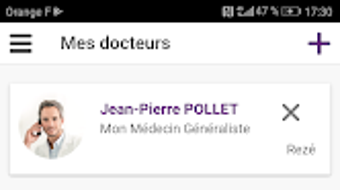
The user interface of DirectoDoc is designed with simplicity and functionality in mind, catering to both medical professionals and general users. Navigation is straightforward, allowing patients to initiate a consultation request with minimal steps after downloading the app. The workflow begins with the patient selecting a doctor who has joined the platform, scheduling a time, and confirming the appointment. During the session, the interface supports clear video and audio transmission, with intuitive controls for muting, camera toggling, and end-of-call actions.
For doctors, the app provides a dedicated dashboard to manage incoming requests, view appointment schedules, and conduct consultations. The interface prioritizes clarity and ease of use, minimizing disruptions during sensitive medical discussions. While specific performance metrics such as CPU or RAM usage were not provided, the app is designed to operate efficiently on standard Android devices. The developer did not specify resource usage details, but general software behavior suggests optimized performance for routine telehealth tasks.
Stability and reliability are central to the app’s design, particularly given its use in healthcare settings. The app is built to maintain connection integrity during consultations, reducing the risk of disconnections. However, actual performance may vary depending on network conditions, device capabilities, and background processes. Users are advised to ensure a stable internet connection for optimal results. Overall, the workflow is logical and user-centered, supporting timely and effective medical interactions without unnecessary complexity.
Compatibility & System Requirements
DirectoDoc is available as an Android application, compatible with devices running the Android operating system. The app is designed to function across a wide range of screen sizes, ensuring usability on smartphones, tablets, and other Android-powered devices. The latest version, 3.2.1, was released on May 1, 2024, and the app’s installation size is 27.7 MB, indicating a lightweight footprint suitable for most mobile devices.
Exact system requirements were not listed by the developer. As such, compatibility with specific Android versions or hardware specifications remains unspecified. The developer did not provide additional system requirements, so users are advised to ensure their device meets general Android standards for running modern applications. The app’s ability to operate on all screens suggests broad compatibility, but performance may vary based on individual device configurations. Users should verify their device’s operating system version and available storage before installation.
Pros and Cons
Pros
- Free to download and use on the Google Play Store.
- Secure, encrypted video and audio consultations.
- Teleconsultations are reimbursed, matching traditional in-person visits.
- Supports multiple languages, enhancing accessibility.
- Works on all screen sizes and Android devices.
- Simple, intuitive interface for both patients and doctors.
Cons
- Only available for Android, limiting access for iOS users.
- Exact system requirements were not specified.
- Performance details such as CPU or RAM usage were not provided.
- Doctor enrollment is required for patients to use the service.
- Dependent on internet connectivity for real-time communication.
FAQ Section
Is DirectoDoc available for iOS devices?
DirectoDoc is currently available only for Android devices. The developer did not provide information on iOS compatibility.
Is the app safe and secure for medical consultations?
DirectoDoc uses encrypted communication channels to ensure secure video and audio calls, protecting patient privacy during consultations.
How often does the app receive updates?
The latest version, 3.2.1, was released on May 1, 2024. Users can expect regular updates through the Google Play Store.
What type of license does DirectoDoc use?
DirectoDoc is a free application available for download on the Google Play Store. The developer did not specify a license type beyond its free availability.
Can I use DirectoDoc offline?
DirectoDoc requires an active internet connection to initiate and conduct teleconsultations. Offline usage is not supported.
Final Thoughts + CTA
DirectoDoc stands out as a practical and accessible telehealth solution for patients and doctors seeking a secure, reimbursed, and user-friendly way to conduct remote consultations. Its long-standing presence since 2015 demonstrates reliability and continuous improvement. The app’s ability to integrate with existing healthcare reimbursement systems adds significant value, removing financial uncertainty for users. The lightweight design, multi-language support, and universal screen compatibility further enhance its appeal across diverse populations.
While it is currently limited to Android users and lacks detailed system requirements, its core functionality remains strong and focused. The straightforward workflow, combined with secure communication, makes it a compelling choice for individuals looking to reduce travel time and improve access to medical care. Doctors benefit from expanded reach and efficient appointment management, while patients gain convenience and continuity in their healthcare journey.
For those seeking a reliable, free, and secure teleconsultation tool on Android, DirectoDoc delivers on its promise. Download DirectoDoc now to experience seamless, reimbursed medical consultations from the comfort of your home.







